

Happy birthday glitter with a name
A birthday deserves some sparkle: cakes with candles, balloons, presents and Happy Birthday in glitter. Here is where to find them, how to put a name on one, and how to make Happy Birthday in 3D letters or in a snow globe - for Facebook, WhatsApp, or a friend's page.


1 Find a birthday graphic
All the birthday graphics are together at Birthday: cakes, candles, balloons, presents and greetings that sparkle. Click one you like to open its page. For a page or a profile there are birthday blinkies too:


2 Put their name on it
Under most graphics for all ages is the pink button Personalize: add a name. It opens the graphic in the Glitter Editor: type the name, pick a font and a glitter, and save it as a GIF - "Happy Birthday, Emma!" on a cake of her own. How it all works is in how to put your name on a glitter graphic.
3 Happy Birthday in glitter letters
Open the glitter text generator, type Happy Birthday Emma and pick a letter style. The box Copy this to Facebook or Discord gives a link that moves in a post; Make it one glitter GIF makes it one picture, to save or to send on WhatsApp. More in how to make glitter text.
4 Happy Birthday in 3D
In 3D glitter text, the idea Happy Birthday sets it in rainbow glitter with confetti. The letters bounce already. Put the name on a second line, and press Download GIF.

5 A birthday snow globe
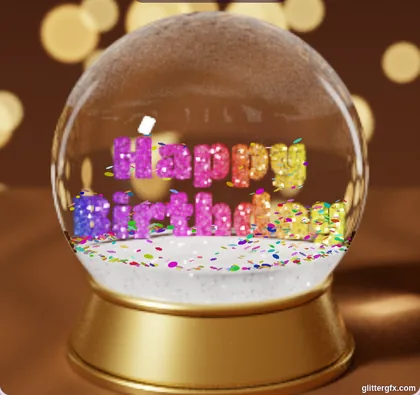
In the Glitter Globe, the idea Happy Birthday puts rainbow letters in a globe on a gold base, with confetti that swirls when you shake it. Type their name, or add a photo of them, and save it as a GIF. All of it is in how to make a glitter snow globe.
6 Send it
A GIF keeps moving on Facebook, in WhatsApp and on Discord. On Facebook, use the box Copy this to Facebook or Discord under a graphic, or add your own GIF to a post as a photo; on WhatsApp, send the GIF as a photo. Step by step: how to post glitter on Facebook and how to save a GIF so it keeps moving.
See the birthday graphics or make Happy Birthday in 3D
Good to know next
 How to put your name on a glitter graphicA name or a greeting in glitter on a graphic, a photo or an empty canvas.
 How to make 3D glitter textPuffy 3D letters of glitter, chrome or fire that move, saved as a GIF.
 How to make a glitter snow globe with your name or photoA snow globe with your name or your photo in it, shaken and saved as a GIF.
 How to post glitter GIFs and glitter text on FacebookThe link that moves on Facebook and Discord, and the GIF for WhatsApp.