

How to make 3D glitter text
Big, puffy letters of glitter that sway, spin or bounce: your name or a greeting in 3D, saved as a moving GIF. Here is how to make it in 3D glitter text, and all the things you can change.
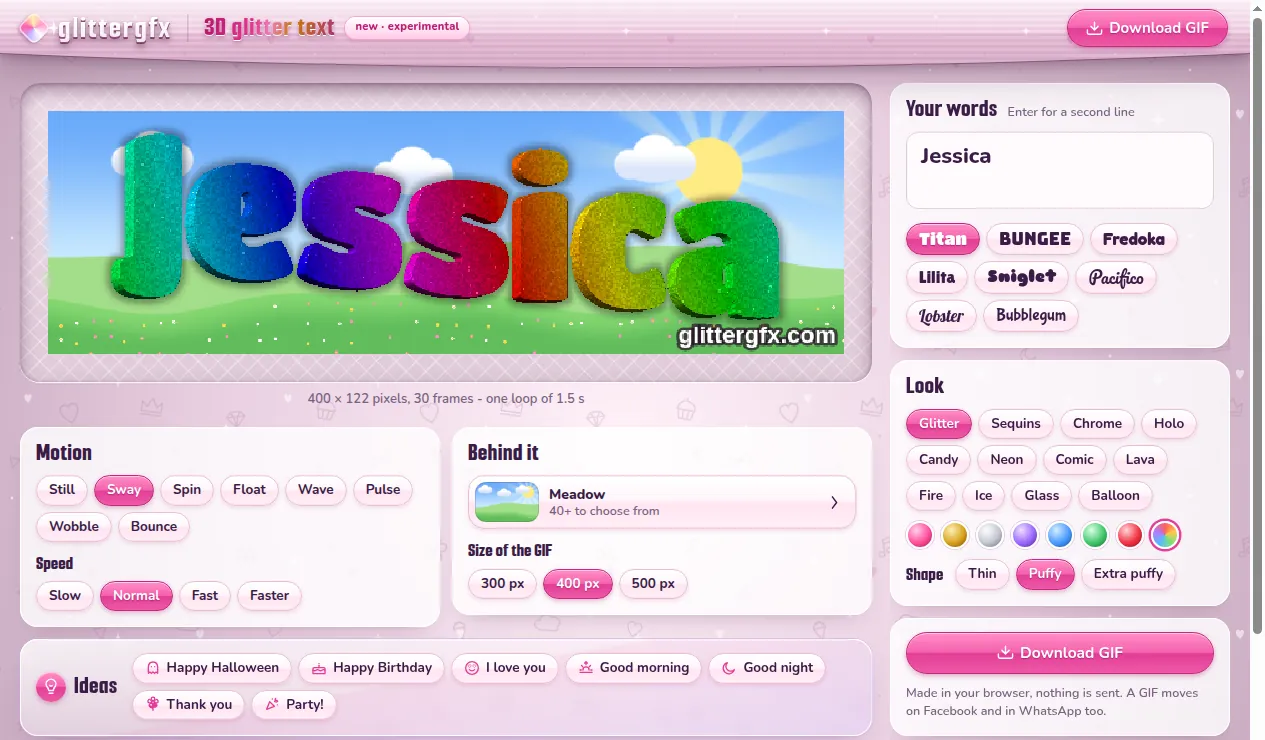
1 Type your words
Open 3D glitter text and type under Your words. Press Enter for a second line: Happy Birthday on top and a name under it. Then pick a letter: Titan, Bungee, Fredoka, Lilita and Sniglet are bold and round, Pacifico and Lobster are written, Bubblegum is playful.
2 Pick a look
- Look: what the letters are made of - Glitter, Sequins, Chrome, Holo, Candy, Neon, Comic, Lava, Fire, Ice, Glass or Balloon.
- A color: pink, gold, silver, purple, blue, green, red or rainbow, where every letter gets a color of its own.
- Shape: Thin, Puffy or Extra puffy, for letters as fat as a balloon.
3 Make it move
Under Motion, pick how your words move: Still, Sway, Spin, Float, Wave, Pulse, Wobble or Bounce. Under Speed: Slow, Normal, Fast or Faster. Under the picture you see how long one round takes.
4 Pick what is behind it
Under Behind it, the button with the meadow opens more than 40 backgrounds: plain pink, white or black, See-through for a page of your own, and pictures drawn to move with your words - snow, a sunset, moonlight on the water, confetti, hearts, cherry blossoms, the sea. At the bottom, More backgrounds from Glitter Graphics lets you pick one of the site's own.

5 Save it as a GIF
Under Size of the GIF, pick 300, 400 or 500 pixels wide - 400 is good for Facebook and WhatsApp. Then press Download GIF. On a phone, Save to Photos or share opens the list of apps to send it straight away. It is made in your browser: nothing is sent anywhere.
6 Start from an idea
Under Ideas, one tap sets the words, the look and the background together: Happy Birthday, Good morning, Good night, I love you, Thank you, Party! and Happy Halloween. Change the words after, and it is yours.

Prefer flat glitter letters, or the code for your page? That is the glitter text generator: see how to make glitter text.
Make 3D glitter text or put your words in a snow globe
Good to know next
 How to make glitter textYour words in glitter letters, for Facebook, a chat or your page.
 How to make a glitter snow globe with your name or photoA snow globe with your name or your photo in it, shaken and saved as a GIF.
 How to put your name on a glitter graphicA name or a greeting in glitter on a graphic, a photo or an empty canvas.
 How to post glitter GIFs and glitter text on FacebookThe link that moves on Facebook and Discord, and the GIF for WhatsApp.