

How to give your page a glitter background
A glitter background is one small picture - a tile - repeated over the whole page, like wallpaper. Every background on Glitter Graphics comes with a few lines of code that do exactly that. Here is what they say, where they go, and how to keep your words readable on top of all that sparkle.
Welcome to my page! The glitter hearts are one tile of 200 × 200 pixels, over and over. These words sit in a box, so they stay easy to read.
1 Pick a background
Look through all backgrounds, or a group of them: hearts, starry, nature and more. Click one to open its page. Most tiles are made so that their edges fit together: you do not see where one ends and the next begins.
Moving ones move behind everything on your page. That can be lovely, but a calm tile is easier on the eyes when there is a lot to read; still backgrounds do not move at all.
2 Copy its code
On the page of a background, the box Copy this HTML code to your profile or website holds its code. Click in the box to select it all, and copy it.
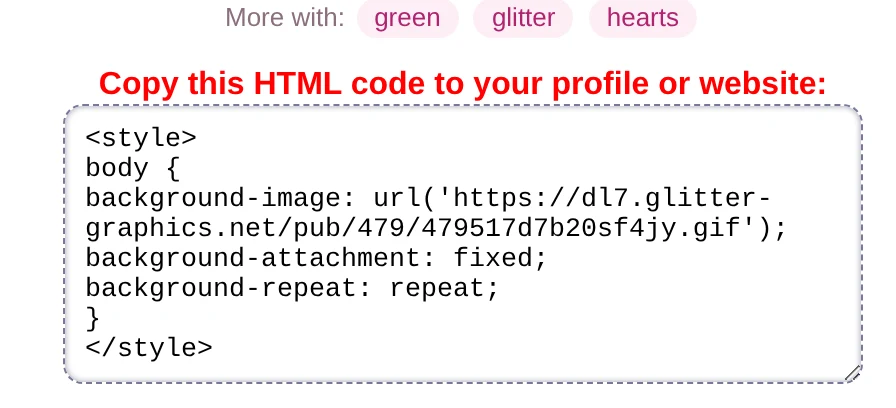
Line by line:
<style>
body {
background-image: url('https://dl7.glitter-graphics.net/pub/479/479517d7b20sf4jy.gif');
background-attachment: fixed;
background-repeat: repeat;
}
</style><style>and</style>: what is between them is CSS, the language that says how a page looks.body { }: the rules inside are for the whole page.background-image: the tile, which stays on Glitter Graphics.background-attachment: fixed: the background stays where it is when you scroll, and the page slides over it. Leave this line out and the background scrolls along with the page.background-repeat: repeat: the tile repeats across and down until the whole page is covered.
3 Put it on your page
- Neocities: on your dashboard, click Edit next to
index.html, paste the code in the<head>of the page, just before</head>, and press Save. (A style further down the page works as well, but the head is where it belongs.) - SpaceHey: styles go in the About Me of your profile, where layouts go too: paste the code there and save.
- A page of your own: the same as on Neocities, in the head of the page.
Does your page have a background already? Look in its CSS (on Neocities often a file called style.css) for a
background line inside body { }. Change that line, or take it out, so the two do not fight.
4 Keep your words readable
Words right on top of glitter are hard to read. The simple way out: put them in a box with a plain, slightly see-through background, like the welcome text in the window at the top.
Words in a box with a background of their own
<div class="box">
  Your words here
</div>

<style>
  .box { background: rgba(255, 255, 255, .85); padding: 16px; border-radius: 12px; max-width: 600px; margin: 20px auto; }
</style>
The .85 is how solid the white is: 1 is not see-through at all, .5 lets half the
glitter through.
Add a color too. Put background-color: #0a9a5c; (or a color that matches your tile) in the
body { } of the code. The page shows that color while the tile is loading, and if the tile ever cannot be
found.
Good to know
- Some phones, iPhones among them, scroll a fixed background along with the page anyway. Nothing is wrong with your code.
- A small tile repeats more often than a big one: a tile of 100 × 100 pixels makes a busier pattern than the same picture at 400 × 400.
- Want the tile on your own site? Save it, upload it, and put its own name in the code:
url('/my-background.gif'). How to upload is in step 3 of the Neocities tutorial. - Graphics on top of your new background? See How to put a glitter graphic on your website, blog or profile.
Good to know next
 How to put a glitter graphic on your website, blog or profileThe code under every graphic, and where it goes: Neocities, Blogger, WordPress, SpaceHey.
 How to add blinkies to your Neocities pageCopy the code or upload the GIF, a wall of blinkies, and a blinkie of your own.
 How to put graphics side by side, or in the middleSide by side, a row that wraps, or in the middle: a line or two of code.